I know what you're thinking. "Not another long shadow icon pack." Well this isn't that. Entirely. What makes Influx different is the love that goes into each pixel. You'll find no scripts or batch operations here. Each shape is in vector format and optimized and aligned to achieve pixel perfection before shining a little light on things. Using a subtle gradient structure and (finally) sticking to a fixed color palette, Influx is slowly proving itself to be my best offering into the world of Android customization.
Showing posts with label android. Show all posts
Android App Icon Template (For Modern Devices) [FREEBIE]
This template was created to make generating Play Store and app icons a breeze. It comes with three styles and multiple configurations to choose from. Designed with modern Android devices in mind it features a Nexus 5 mock up to see your app's new icon in all it's glory.
Update: Now has options for icon backgrounds that conform to Android guidelines.
So, what do I do with it?
Simply download the .PSD file below and open it with Photoshop.
In the layers panel, find the layer that's titled "Artwork" and double click the layer thumbnail.
What opens is a .PSB smart object, go ahead and choose your style and add your logo, artwork, etc.
Close the .PSB window and make sure to save the changes.
Once it saves all of the scaled icons will automatically render along with it.
Cool, now what?
Use the provided action to export the assets.*
*Using CS6? There is a known bug that saves the files as .html files. Simply rename the extensions to .png and you should be fine.
If you have any questions or something doesn't work, email me. arandompackage@gmail.com
Nexus 5 Concept Lock Screen
I saw a Nexus 5 concept by @TechyTee and knew I had to have the lock screen immediately......
So I went ahead and used a couple handy apps to create the sumbitch. First off, this is a Widgetlocker theme, however, the Zooper skins can (obviously) be used wherever.
I also threw together a handy installer app for the skins and the slider. Get it HERE
Need a dark wallpaper? Get one HERE
Use an image editor (Photoshop, GIMP, etc...) to personalize the widget. 225x225 pixels is a good size. ;)
[Read more]
So I went ahead and used a couple handy apps to create the sumbitch. First off, this is a Widgetlocker theme, however, the Zooper skins can (obviously) be used wherever.
I also threw together a handy installer app for the skins and the slider. Get it HERE
Need a dark wallpaper? Get one HERE
Use an image editor (Photoshop, GIMP, etc...) to personalize the widget. 225x225 pixels is a good size. ;)
The Future of FlatCons
I'm sure everyone thinks that I have abandoned Flatcons, don't fret because I haven't. As I learn more about automation and batch operations with PhotoShop, I'm going to try to get more updates like this out there. This update, which includes 100 icons, was not done using automation (it still looks bad IMO and I'm still ironing that out). Look for more flatcon updates throughout the week and a new color or two just may join the mix.
A new kind of Jive
Jive Icons are compatible with most third party replacement launchers (Apex, Nova, Holo, ADW, GO, TSF and Next). Optimized for high resolution devices and look amazing on tablets and phones alike. At 144x144 these vector icons also scale down to look just as sharp on smaller screens.
Features
-Over 200 handcrafted icons to get started
-Compatible with Apex, Nova, Holo, ADW, Go, TSF Shell and Next Launcher. May work on other launchers, I just haven't tested them.
-Five wallpapers using the flatui color palette
-Font included is Suisse BP
-Analog clock widget
-Wallpaper chooser
-Icon request feature by Big DX
-Compatible with Apex, Nova, Holo, ADW, Go, TSF Shell and Next Launcher. May work on other launchers, I just haven't tested them.
-Five wallpapers using the flatui color palette
-Font included is Suisse BP
-Analog clock widget
-Wallpaper chooser
-Icon request feature by Big DX
I have also just put together a demo version. It includes fifty five icons and five wallpapers so you can get a feel for the theme. Some features were removed, i.e the clock widget and the icon request feature.
Nova Launcher Wallapers
To apply these wallpapers in Nova Launcher, first download them to your sdcard, then open your gallery app of choice and navigate to desired wall. In the options menu, select "Set as Nova Wallpaper". Easy.
Dark Blue
Minimo Wall One
Stock'd One
Stock'd two
Stock'd three
Flatcon Walls
The color palette used for Flatcon Wallpapers can be found here
Tweak the Apex Theme Sample For Ultimate Compatibility
A Quick Tutorial
First of all, here are the links I mention in the video.
If you have questions, read ALL the posts before asking.
If you don't know Github, just click download as .zip, however, feel free to clone and fork if you do.
Useful information is never wasted. ;)
And finally, the video.
Because sometimes, it's just easier to watch someone else do it first.
Thanks to Dennisxl, Kovdev, Blackbearblanc, Sammycakes, Pooley :), Bagarwa and more...
Stock'd Icon Pack
Available on Google Play.
Compatible with the following launchers: Apex, Nova, Holo, ADW, Launcher Pro
How to apply icons
Apex Launcher
Menu> Apex settings> Theme settings> Choose Icons> apply
Nova Launcher
Menu> Nova settings> Look and feel> icon theme> select icons
ADW Launcher
Menu> ADW Settings> Themes> Select Icons> Apply
Holo Launcher
Menu> Launcher Settings> Appearance Settings> Select Icons
To change icons on your homescreen:
Long press app icon then select edit, then tap the icon and select the icon pack from the menu that pops up.
If the theme or skin does not show up in the theme/skin selection list, shoot me an email and I will send you the fix. It's easy and takes only minutes as I can reply with the fix from anywhere. Please don't just ask for a refund or leave a bad review. That's just in poor taste. Happy theming!
All of my icon packs will be updated regularly based on request sent via email.
FlatCons
By Unknown
Posted On
Friday, April 05, 2013
//
FlatCons for Android
Now available free of charge!

Flatcons by Alex Miller is licensed under a Creative Commons Attribution-NonCommercial-NoDerivatives 4.0 International License.
Freebie! Android Devices [Flat+Wireframe]
By Unknown
Posted On
Tuesday, April 02, 2013
//
(Requsted) Note II Titanium
Galaxy Nexus
HTC One
Note II
Galaxy S IV
Nexus 4
Xperia Z
Wire Frame Devices
I was practicing in Illustrator the other morning, with the pen tool among other things, and these just kinda came to life. Get 'em for free at the link below, use 'em for whatever.
Digital Slab Uccw Clock
By Unknown
Posted On
Friday, March 29, 2013
//
Digital Slab is a responsive clock for UCCW
Set using a 4X3 Uccw widget
Update 4.02.13: Now more centered
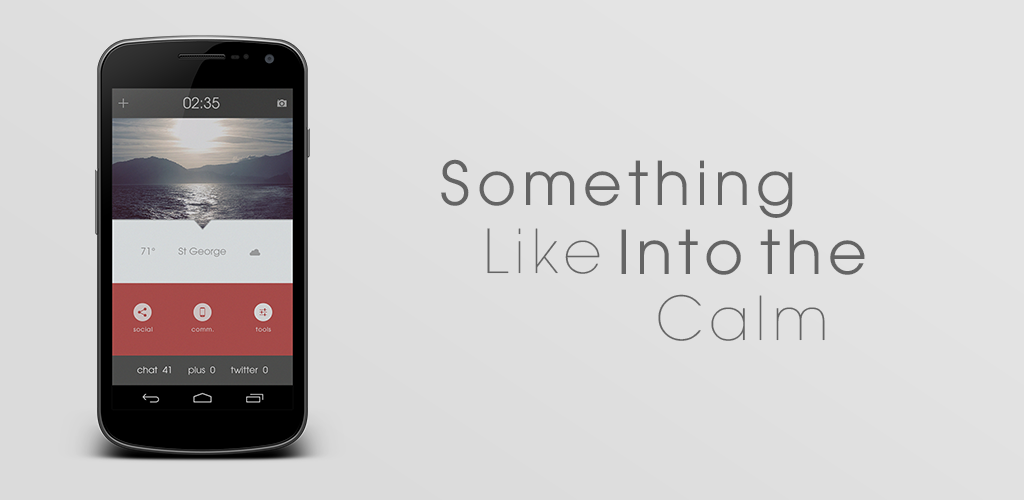
Something Like Into The Calm[Update with Missed it! tutorial]
By Unknown
Posted On
Wednesday, March 06, 2013
//
Sized to fit 720x1280 resolution devices
Set wallpaper with Multipicture Live wallpaper or equivilant
Apex Launcher Grid 10x9
Single Screen
No margins or shadows
Hide labels and notification bar
Folder shortcuts are apex folders with transparent icon
Bottom notification widget is Missed it!
Then add shortcut is for adding calendar events, edit it to fit your needs
PSD File included for further customization
How to make the Missed it! widget:
After adding a 4x1 missed it widget to your homescreen, it brings up a dialog box. Give the widget a name if you wish. Next tap on "Monitored elements". The default elements are sms, phone and gmail. Long press on each one and select remove. Then tap the menu button and select "add", then select "application". From here you may need to enable Missed it in the accessibility menu.
Add whatever apps to the monitored list that you wish, my example is for a social counter.
Tap on the monitored element and this box appears. The %c is the code for the digit in the output. (Default output in this case would be; 5 Falcon Pro notifications") Edit the fields untill they look like this:
Now the output will read "twitter 5"
Now go into the output format menu and tap "Customize". The default will look like this:
[nl] stands for "new line". Delete all those. then place each value on the same line with about five spaces in between each. Here's a shot of what it should look like:
Now you can go into the Appearance menu and change font, color, etc. One important thing to remember is to go into the Layout menu and center the horizontal and vertical alignments.
So there you have it. A basic rundown of Missed it! widget. Sorry there's no video, screencasting doesn't really work on Android 4.2 and I don't have a good enough camera to record, so I hope this will suffice.


