Showing posts with label psd. Show all posts

Android App Icon Template (For Modern Devices) [FREEBIE]

Posted On // Leave a Comment

This template was created to make generating Play Store and app icons a breeze. It comes with three styles and multiple configurations to choose from. Designed with modern Android devices in mind it features a Nexus 5 mock up to see your app's new icon in all it's glory.

Update: Now has options for icon backgrounds that conform to Android guidelines.

So, what do I do with it?

Simply download the .PSD file below and open it with Photoshop.
In the layers panel, find the layer that's titled "Artwork" and double click the layer thumbnail.
What opens is a .PSB smart object, go ahead and choose your style and add your logo, artwork, etc.
Close the .PSB window and make sure to save the changes.
Once it saves all of the scaled icons will automatically render along with it.

Cool, now what?

Use the provided action to export the assets.*
*Using CS6? There is a known bug that saves the files as .html files. Simply rename the extensions to .png and you should be fine.

If you have any questions or something doesn't work, email me. arandompackage@gmail.com

[Read more]

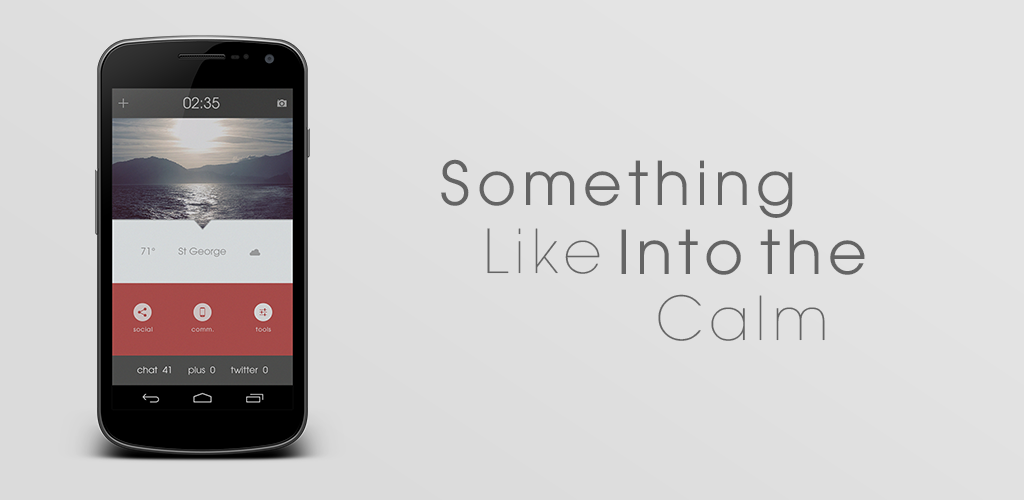
Something Like Into The Calm[Update with Missed it! tutorial]

Posted On //


Sized to fit 720x1280 resolution devices

Set wallpaper with Multipicture Live wallpaper or equivilant

Apex Launcher Grid 10x9
Single Screen
No margins or shadows
Hide labels and notification bar

Folder shortcuts are apex folders with transparent icon

Bottom notification widget is Missed it!

Then add shortcut is for adding calendar events, edit it to fit your needs

PSD File included for further customization


How to make the Missed it! widget:

After adding a 4x1 missed it widget to your homescreen, it brings up a dialog box. Give the widget a name if you wish. Next tap on "Monitored elements". The default elements are sms, phone and gmail. Long press on each one and select remove. Then tap the menu button and select "add", then select "application". From here you may need to enable Missed it in the accessibility menu. 

Add whatever apps to the monitored list that you wish, my example is for a social counter.


Tap on the monitored element and this box appears. The %c is the code for the digit in the output. (Default output in this case would be; 5 Falcon Pro notifications") Edit the fields untill they look like this:


Now the output will read "twitter 5"

Now go into the output format menu and tap "Customize". The default will look like this:


[nl] stands for "new line". Delete all those. then place each value on the same line with about five spaces in between each. Here's a shot of what it should look like:


Now you can go into the Appearance menu and change font, color, etc. One important thing to remember is to go into the Layout menu and center the horizontal and vertical alignments.

So there you have it. A basic rundown of Missed it! widget. Sorry there's no video, screencasting doesn't really work on Android 4.2 and I don't have a good enough camera to record, so I hope this will suffice. 


[Read more]

Twitter profile widget PSD (FREEBIE!)

Posted On // Leave a Comment


I recently became more active on Twitter (yay!) and decided it was also time for another freebie. I put this together rather quickly so if anyone has any tips to improve the layout leave em in the comments.

Download the PSD


[Read more]